What a mod can add
Four kinds of content, all of them made in the Unreal Editor, none of them needing a line of C++.
Terrains
Your own forest, swamp or trench, added to the map list in the base.
Characters
An extra pick in the character select, or a replacement for one of ours.
Creatures
A monster with working AI from a single data asset, or your own brain on top.
Mechanics
Your own rules: react to a picked mushroom, a sold basket, nightfall, a death.
The game's own data
Prices, species, contracts, emotes. Add a row, or replace one of ours.
Everything your mod contains lives under its own name, so two mods can both have a creature called
Wolf without ever colliding. Your assets are mounted at /YourModName/.
Before you start
Three things, and the third one is the part most people miss.
| What | Why |
|---|---|
| Unreal Engine 5.8 | The game is built on 5.8. An older engine cannot open the SDK project. |
| Holy Shroom! Mod SDK | The project you open in the editor. 4 MB, and it carries the mod API, the packaging tools and a working example. |
| The game on Steam | You test the mod in the real game, and the Workshop upload goes through your Steam account. |
The game's tables are open to mods: a mod can change what a mushroom is worth, what the shop sells and which contracts show up, on top of adding creatures, characters and terrains.
Unzip it anywhere and open HolyShroomModSDK.uproject. The plugins come compiled, so you do
not need Visual Studio and there is nothing to build.
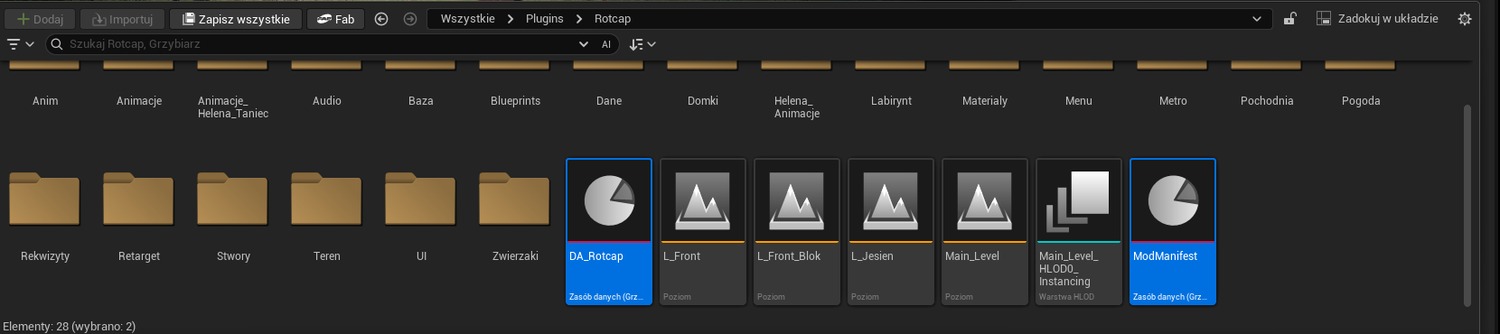
Rotcap, a creature built from data alone, and
Hunger, a mechanic written entirely in a Blueprint graph. Both are on the Workshop, so you can
read the files and play the result side by side. When a new version of Holy Shroom! ships, take the new
SDK: an old snapshot cooks mods against an old game.
A mod is a content-only Unreal plugin that sits in the Mods folder of the SDK project:

1Create the mod
One menu entry. It writes the descriptor, the folder and the manifest for you.
- Open the Mod SDK project in Unreal Editor 5.8.
- Go to Tools → Ultimate Mod Kit → New Mod…
- Type a name, your author name and one sentence about what the mod does.
The Content Browser now shows /MyCoolMod/ and you can start dropping assets in. You
never need the Python console for any of this: the same menu packages the mod and publishes it.
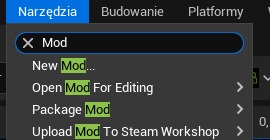
The whole menu
| Tools → Ultimate Mod Kit | What it does |
|---|---|
| New Mod… | Creates the mod: descriptor, Content folder, manifest, placeholder preview image. |
| Open Mod For Editing | Re-opens a mod after an editor restart. |
| Package Mod | Cooks it into the archive players download. |
| Upload Mod To Steam Workshop | Publishes it, or updates your item. |
If you would rather script it, the same four things are on unreal.GrzybiarzModTools in the
Python console — but nothing in this guide requires it.
2Fill in the manifest
The manifest is the game asking: so what exactly did you bring?
Open /MyCoolMod/ModManifest. Every field is a list you add to.
| Field | What it does |
|---|---|
Maps | Adds terrains to the pick-a-forest list in the base. |
Characters | Extra cards in character select, or a replacement for one of ours. |
Creatures | One entry per creature profile. |
Mechanics | Your components, injected into the player or into creatures. Target says which. |
Tables | The game's own data: prices, species, contracts, emotes. |
RequiresMods | Your mod refuses to start without these. |
Characters: body and animations
A character here is not a pawn class - it is a row of data (body, stat bars, voice) that the shared player body uses. Two fields decide how it moves:
| Field | What it does |
|---|---|
Mesh | The body. Janusz_Skeleton ships with the SDK, so import your mesh onto it (or mark your skeleton compatible with it) and every animation and montage in the game plays on your character for free. |
AnimClass | Your own Anim Blueprint, for a body on a skeleton of your own. Empty = the game's animations. |
Janusz_Skeleton and will not play on a foreign one. Your own Anim Blueprint gives
your character walking, running and idling; those gestures stay missing until you rebuild them yourself.
For most characters the easy road is the right one: build the body on our skeleton and leave
AnimClass empty.
Mechanics: where your component goes
A mechanic is a Blueprint deriving from Grzybiarz Mod Mechanic Component, listed under
Mechanics with your blueprint in ComponentClass. Target picks who
gets it:
| Target | Who gets the component |
|---|---|
| Player | The picker. Use this for anything that happens to the person playing. |
| Creature | Creatures from any mod. |
| Custom class | A class you ship yourself, named in TargetClass. |
Mods/HungerMod in the SDK is exactly this: one component on the player, all the logic
in a Blueprint graph, no C++.
Tables: changing the rules, not just adding to them
Make a Data Table with the same row type as ours, and list it under Tables
with the name of the table it joins:
| TableId | Joins | What you can do |
|---|---|---|
Mushrooms | mushroom species | add a species, or change a price, freshness or trip effect |
Shop | the shop | add an item, or change what one of ours costs |
Missions | contracts | write your own, or change a reward |
Emotes | the emote wheel | add a dance |
Creatures | the bestiary | add an entry |
Terrains, Characters | forests and pickers | same as the fields above |
Two rules decide everything:
- a row whose key the game does not have is added: a new species, item or contract,
- a row whose key the game does have replaces ours: that is how you double what a bolete sells for.
Set bMayOverrideBaseRows to false if your mod should only ever add things; the game then
leaves its own rows alone and tells you in the log when your table collides with one. Changing prices makes
your mod gameplay-affecting, so everyone in a co-op session needs it. That happens by itself.
ModManifest, exactly. A mod without one still mounts its assets, it just adds nothing by itself.
3Example: a creature in ten minutes
The shortest useful mod there is. One data asset, and the game gives it a working brain: idle, wander, chase, attack, flee, die.
Right click in your mod folder and create a Grzybiarz Mod Creature Profile, or make it from the console:
unreal.GrzybiarzModTools.create_mod_data_asset(
    "MyCoolMod", "DA_MyCreature", unreal.GrzybiarzModCreatureProfile)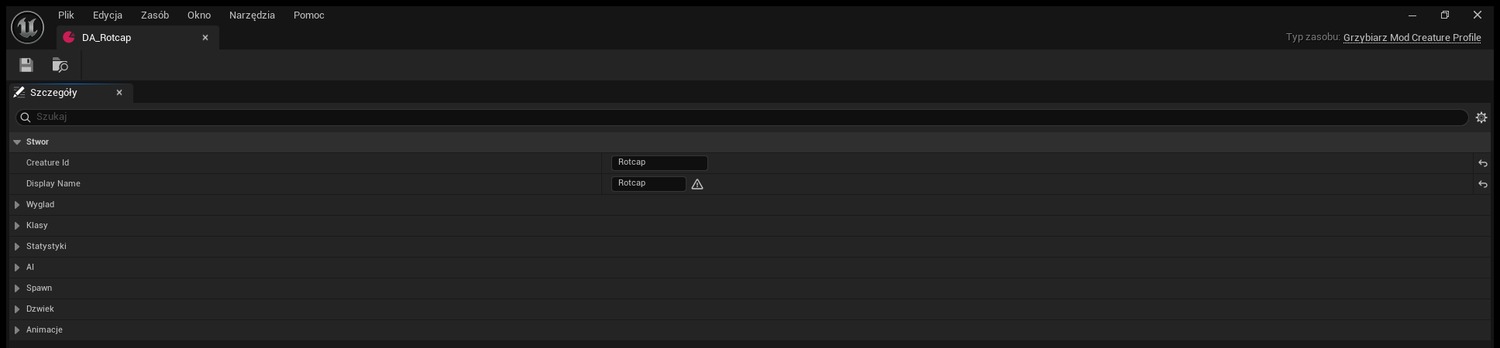
Then fill it in. These are the numbers from Rotcap, the first published mod, so you can copy them and change one thing at a time:
| Field | Value | What it means in play |
|---|---|---|
Mesh + AnimClass | skeletal mesh + its anim blueprint | Leave AnimClass empty and your creature stands there like a statue. |
Health | 70 | Dies to a handful of hits. |
Damage | 10 | A player has 100 health, so ten hits. |
RunSpeed | 460 | Slower than a sprinting picker. They can get away. |
SightRadius | 1800 | 18 metres. Centimetres everywhere, this is Unreal. |
bRequiresLineOfSight | false | It smells you through the trees. Turn it on for a creature that hunts by sight. |
FleeHealthFraction | 0.25 | Runs away once it is down to a quarter. 0 means it never runs. |
TimeOfDay | 1 | 0 anytime, 1 night only, 2 day only. |
MaxAlive | 4 | How many of them can be in the forest at once. |
ThinkInterval | 0.3 | How often it makes a decision. This is a timer, not a tick. |
Want more than the built-in brain?
- Level 2: set
ControllerClassto your own AIController. The game still spawns it, counts it, handles damage, death and networking. You only decide how it behaves. - Level 3: set
PawnClassto your own Character class. The game only spawns it and counts it. Everything else is yours.
Last step: add the profile to Creatures in the manifest. A creature nobody lists is a creature
nobody sees.
4Test it in the editor
Two tests, and they answer different questions. The SDK has no game in it, so the game itself is where a mod is finally proven.
In the SDK: does the game accept the mod at all
- Mount the mod (see step 1).
- Watch the Output Log, category
LogGrzybiarzMods. Mounting the mod and loading its manifest both report there, and so does every table it changes:doklada do tabeli 'Mushrooms': 20 wierszy. - If the manifest has a mistake, it is named here: a table entry without an id, a creature profile that would not load, a table the game does not know.
In the game: does it actually do something
- Package the mod (step 5).
- Copy the packaged mod folder into
Modsnext to the installed game, so that you end up withHolyShroom/Mods/YourMod/YourMod.upluginandHolyShroom/Mods/YourMod/Content/Paks/Windows/. - Start the game, open MODS, tick your mod, press APPLY.
- The row tells you what the game took from it, for example
2 tablesor1 creature. If it saysAssets only., your manifest declared nothing.
This second test is the one that matters. A mod can look perfect in the editor, where its assets are loose files on disk, and still arrive empty in a packaged game, where everything lives inside an archive. Do not skip it, and do not announce a mod you have only seen in the editor.
5Package it
In the editor, raw asset files work. In the real game they do not, and this is where most first mods die.
The packaged game reads cooked content, a .pak inside your mod's
Content/Paks/<Platform>, for example Content/Paks/Windows.
You never build that by hand:
preview.pngin the mod folder, under 1 MB. Without it your item has no thumbnail, and an item with no thumbnail is one nobody clicks.preview.jpgorResources/Icon128.pngwork too."UMKTags": ["Creature"]in your.uplugin. Without it the upload sends no tags at all and nobody filtering the Workshop will find you.
Tools → Ultimate Mod Kit → Package Mod → your mod. Package Mod and Upload are submenus: they list every mod the kit can see, and you pick yours.
Your mod is cooked on top of a snapshot of the shipped game. Anything you re-use from the base game, a mesh,
an animation blueprint, a sound, stays out of your .pak and costs you nothing. That is why a good
creature mod can weigh a few kilobytes.
6Upload to the Steam Workshop
Tools → Ultimate Mod Kit → Upload Mod To Steam Workshop → your mod
Mods/.
What ends up on your Workshop page is taken from files you already have:
| On the page | Comes from |
|---|---|
| Title | FriendlyName in your .uplugin |
| Description | Description in your .uplugin |
| Tags | UMKTags in your .uplugin |
| Preview image | preview.png, preview.jpg or Resources/Icon128.png in your mod folder |
Make the preview a square, somewhere around 512 by 512, and keep it under 1 MB: that is
Steam's limit for a Workshop preview image. A 4K screenshot dropped in as preview.png is the most
common reason an upload comes back with an error that explains nothing.
The first time you upload anything to a Workshop, Steam asks you to accept the Steam Workshop Terms of Service. Until you do, uploads from any tool fail.
.uplugin in its
root, so it looks perfectly fine on your machine and is rejected on every subscriber's machine. Upload what the
kit builds for you and nothing else.
Bump VersionName on every release. Players paste their mod list into bug reports, and the version
is what tells you which build they were on.
7Your item page on Steam
Most of your item page is written by your mod, not by you clicking around on Steam.
The title, the description and the tags come from your .uplugin
(FriendlyName, Description, UMKTags) and are sent again on
every upload. Fix a typo in the descriptor, upload, and the page follows. The flip side: if you
rewrite that text by hand on Steam, your next upload overwrites it. To keep the page yours, put
"SyncDescription": false into the mod's workshop.json and the uploader stops
touching it.
Visibility is also set by the upload, so a new item does not sit there private waiting
for you to find the switch. It comes from "Visibility" in workshop.json, and when
that field is absent, from the game's own default, which is public:
{
    "ItemId": "3826200138",
    "Mod": "RotcapMod",
    "Visibility": "public"
}
public is listed and searchable, unlisted works by direct link and can still be
subscribed to, friends is your Steam friends only, and private is you alone. Set it
here rather than on the Steam page: a change made on the page is undone by your next upload.
What is still yours to do on Steam:
- Open Workshop → Your Files → Your Workshop Files, or go straight to the item
by its id, the number the kit writes into
workshop.json. - Add screenshots. Three or four from inside the game, showing the thing your mod adds. The uploader does not send these, and they are what decides whether anyone subscribes.
Check it like a player would
- Subscribe to your own item.
- Start Holy Shroom!
- Open MODS. Your mod is in the list, with the name and description from the
.uplugin. - Tick it, press APPLY, play.
8Updating your mod
Same two clicks, one number.
- Change whatever you are changing in the editor.
- Bump
VersionNamein the.uplugin. - Package Mod again.
- Upload Mod To Steam Workshop again. Thanks to
workshop.jsonthis updates your existing item instead of making a second one. - On the item page, write a short change note. Subscribers get your update automatically and a note is the only way they learn what moved.
When something breaks
The mod list in the game says all of this out loud. Here is what each line means.
| What you see | What to do |
|---|---|
| The .uplugin file is missing ExplicitlyLoaded | Add "ExplicitlyLoaded": true and "CanContainContent": true to the json. Both are required: without them the game cannot mount your mod while it runs. |
| The mod's content could not be mounted | There is no Content folder, or CanContainContent is missing. |
| Made for mod API N | Your GrzybiarzModApiVersion does not match this build of the game. Update the mod. |
| This mod interrupted the previous launch | The game crashed while your mod was starting, so it was parked to let the game boot. Fix it, then tick it again. |
| Your creature stands still | AnimClass is empty, or the anim blueprint does not match the mesh skeleton. |
| Your creature is sunk into the ground | The mesh pivot is not at its feet. Raise it with MeshZOffset. |
| Nothing of yours appears in the packaged game | You shipped raw assets instead of a packaged mod. Go back to step 5. |
| The upload worked, nobody can find the mod | Check "Visibility" in the mod's workshop.json. If it says
private or friends, change it and upload again. Steam also takes a few
minutes to index a brand new item. |
| The upload fails and says nothing useful | Two usual causes: your preview image is over 1 MB, or you have never accepted the Steam Workshop Terms of Service on this account. |
| Your second upload made a second item | workshop.json next to the mod was deleted or moved. Delete the duplicate item and keep that file from now on. |
Co-op rules
Holy Shroom! is played together, and that puts three rules on your mod.
- The server owns the run. Anything that changes the world runs on the server. Calling a server action from a client writes a loud warning into the log instead of quietly doing nothing.
- Gameplay mods must match. The game builds a fingerprint from the enabled gameplay mods and
their versions. Cosmetic mods do not have to match; set
bForceGameplayAffectingif the game guesses wrong. - Never move something under a player's feet every frame. It looks fine for the host and tears apart for everyone who joined.
Money and progress live in the profile of the machine you are on, not in the world: in co-op everybody has their own wallet.