Buildsworn Cookbook: building a game with Claude, the way we do it
Recipes from our own production (a co-op driving game, a farm simulator, a forest horror, a 2D shooter). Each one has the same shape: what you say, what happens (which tools do the work), how you prove it. Copy the prompts as they are; change the names.
Two rules behind every recipe:
1. Editor work goes through Epic's unreal-mcp (Blueprints, widgets, levels, materials, data tables). Code, build and proof
go through Buildsworn. On UE 5.6/5.7 the editor part uses Buildsworn's own bridge (ue5_editor_exec, ue5_snippet) instead.
2. "Done" is a table, not a sentence. Every recipe ends with /gate or a screenshot. The table (real output, demo project):
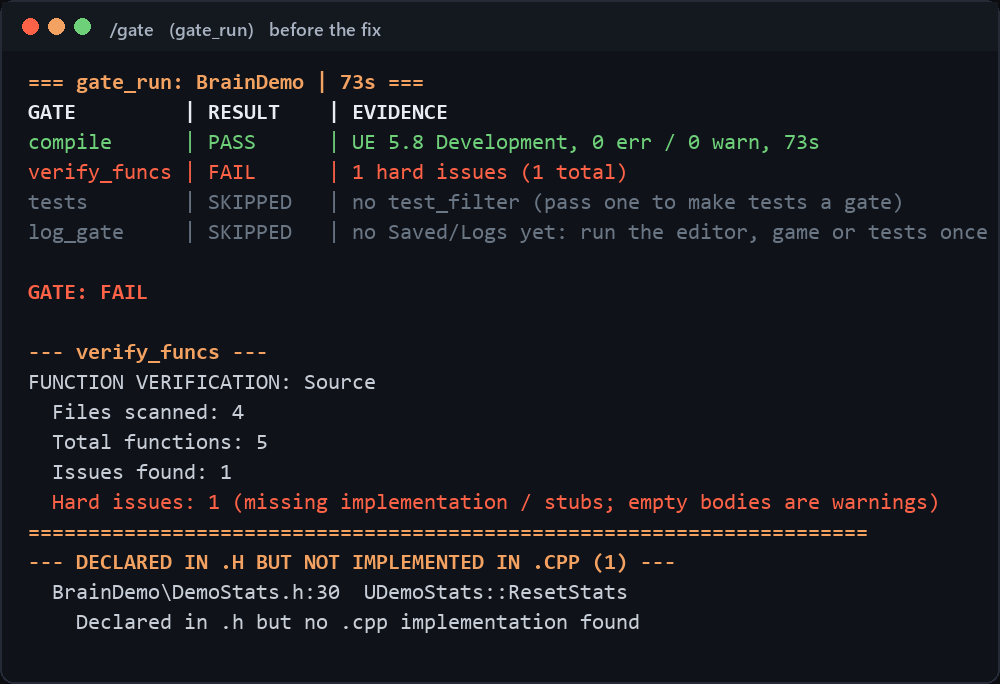
Assumed: the editor is open, the terminal is in the project folder, /start was green.
1. A new gameplay actor: C++ class, Blueprint child, placed in the level
Say
Create a C++ actor
AFuelBarrelin the project module: a static mesh component as root, afloat Fuel = 100UPROPERTY (EditAnywhere, BlueprintReadWrite, Replicated), and aBlueprintCallablefunctionDrain(float Amount)that clamps at 0 and is server-authoritative. Then compile.
What happens: Claude checks the exact signatures against your engine's index (ue_api_search, ue_api_include) instead of
guessing, writes the header and the cpp (every edit gets a .bak next to it), then ue5_compile runs UBT. If the compile
fails, compiler_digest gives it the short list of errors and it fixes them.
Then say
Using unreal-mcp, create a Blueprint
BP_FuelBarrelfromAFuelBarrelin/Game/Props, set the mesh to/Engine/BasicShapes/Cylinder, and place three of them in the current level 500 units apart. Save everything.
Prove it
/gate
compile PASS, verify_funcs PASS (every declared function has a body), log PASS. Then:
Screenshot the viewport with ue_screenshot and tell me how many barrels you see.
2. Multiplayer-safe interaction (the mistake we made so you do not)
Our first co-op prototype let the client decide it picked something up. It desynced on join. The rule since then: the server owns state, the client only asks.
Say
Add pickup to
AFuelBarrel: the client sends a Server RPCServerRequestPickup(AActor* Interactor); the server validates distance (< 300 units) and line of sight, then setsbPickedUp(replicated,OnRep_PickedUphides the mesh). No client-side state changes. Keep the_Implementationand_Validatepattern. Compile.
What happens: same loop as recipe 1. verify_functions knows that OnRep_ and _Implementation functions are the
real bodies, so it does not flag them.
Prove it
/gate Grep the class for any place where the client writes bPickedUp directly (fast_grep "bPickedUp =") and list the hits.
The second line should return only the server path.
3. HUD widget: C++ gives numbers, the widget draws them
Our rule: C++ never draws UI. It exposes data through BlueprintPure, the widget is a UMG asset in the project.
Say
In the player character add
UFUNCTION(BlueprintPure) float GetFuelPercent() constandUFUNCTION(BlueprintPure) FText GetCargoText() const. Compile. Then, using unreal-mcp, createWBP_HUDin/Game/UIwith a progress bar bound to GetFuelPercent and a text block bound to GetCargoText, anchored bottom-left. Use two text sizes only: 36 for titles, 22 for values. Add it to the viewport inBP_PlayerControllerBeginPlay.
Prove it
/gate Play in editor for 5 seconds, take a screenshot with ue_screenshot and check that the fuel bar is visible bottom-left.
4. Data-driven content: a data table the code reads
Say
Define
FMushroomRow : FTableRowBasewith Name (FText), Price (int32), NightOnly (bool), Mesh (TSoftObjectPtr). Compile. Then, using unreal-mcp, create data table DT_Mushroomsfrom that row struct in/Game/Datawith five rows: Chanterelle 12, Bolete 20, Morel 35, Fly Agaric 5 night-only, Ghost Cap 80 night-only. Add aLoadMushrooms()function to the game mode that reads the table on BeginPlay and logs the count.
Prove it
/gate Play in editor for 3 seconds, then run log_gate and show me the line with the mushroom count.
5. Assets referenced from C++ that vanish in the packaged game
This one cost us a release. TSoftObjectPtr loaded from C++ is not seen by the cooker, and a loaded object without a
UPROPERTY is garbage-collected after a minute (crash on the next PlaySound).
Say
Audit the project for TSoftObjectPtr / LoadSynchronous uses in C++. For each: is the loaded object held in a UPROPERTY (Transient is fine)? Is the asset folder listed in DirectoriesToAlwaysCook in DefaultGame.ini? Fix both, compile.
What happens: fast_grep finds the uses, Claude edits the ini and the headers, compiles.
Prove it
/gate Package a Development build with ue5_package, run it for 20 seconds with game_visual_check and run log_gate on its log. "Failed to find object" must not appear.
6. The compile-fix loop, delegated
When the error list is long, hand it to the agent instead of the main conversation.
Say
Compile. If it fails, run the ue-compiler-fixer agent on the error list and report back with the final compile result.
What happens: the agent loops ue5_compile, compiler_digest, Edit, verify_functions until green. It does not change
architecture; if a fix would need that, it stops and tells you.
Prove it: the agent's last message must quote a ue5_compile result. Then /gate yourself.
7. An automation test that runs in the gate
Say
Write an automation test
Project.Cargo.PickupRange(IMPLEMENT_SIMPLE_AUTOMATION_TEST, ProductFilter) that spawns a FuelBarrel and a pawn 500 units away, calls ServerRequestPickup, and expects bPickedUp to stay false. Compile.
Prove it
/gate
The tests row is now PASS 1/1 instead of SKIPPED. From now on every gate runs it. Ask ue_test_run for the JSON if you
need details.
8. A crash from a build a player sent you
Say
Here is a crash log from a player:
. Read it with log_gate, find the callstack, match it to our source with fast_grep, explain the cause in three sentences and propose the smallest fix. Do not edit yet.
Then
Apply the fix, compile, /gate, and write one line for the patch notes with the patch-notes-writer agent.
Our rule for live games: we patch the code, players keep what they earned. Never "fix" by wiping saves.
9. Before a release: let the hostile reviewer at it
Say
Run the adversarial-qa agent on the packaged build in
and the current level. I want exactly five things a player will hit.
What happens: a read-only agent with game_visual_check, ue_screenshot, log_gate and grep. It does not praise. Fix
what it finds, /gate, run it again.
10. Ship to Steam
Say
/release
What happens: steam_release_status (config, steamcmd, app ids), steam_release_audit on the build folder
(steam_appid.txt inside the build = FAIL, .pdb files = WARN, size, executables), steam_release_prepare writes the
SteamPipe vdf with preview=1 and an empty setlive (nothing goes live by accident), then a dry run, then the real upload
when you say so. Your Steam password is typed by you, never stored.
Prove it: the upload log, then the build shows up in Steamworks under the branch you chose. Set it live there, by hand.
11. Keep the project's memory
End of the day
/session-end
Writes a short state note (what was done, what is next, known bugs). Tomorrow's /start reads it, so the next session does
not begin with "where were we".
After a nasty bug
Record this with learn_from_fix: symptom, cause, fix, how to detect it next time.
That is how the playbook in this package was written: one entry per scar, over six games.
What not to do (we tried)
- Do not let Claude use Live Coding; always a normal UBT compile. Live Coding hides missing bodies until the next full build.
- Do not accept "done" without
/gate. The agent is optimistic by nature; the table is not. - Do not build UI in C++, and do not let the agent tune numbers "by feel" (offsets, rotations, timers). Ask for a screenshot, measure, then change one thing at a time.
- Do not run mass operations on assets in one script (rename/delete/create 50 things). One action, one check.
- Do not package after every change. Compile in the session; package once, at the end, on purpose.