The bug happened once on a tester's PC. Make it happen again.
ReplayCore records every source a C++ game draws from - input, random numbers, the clock, iteration order, the arithmetic of the machine itself - then replays the session step for step. When the replay parts from the recording, it names the step, the source and the value. And it lets you step back into the session instead of playing up to the bug again.
See pricing How it works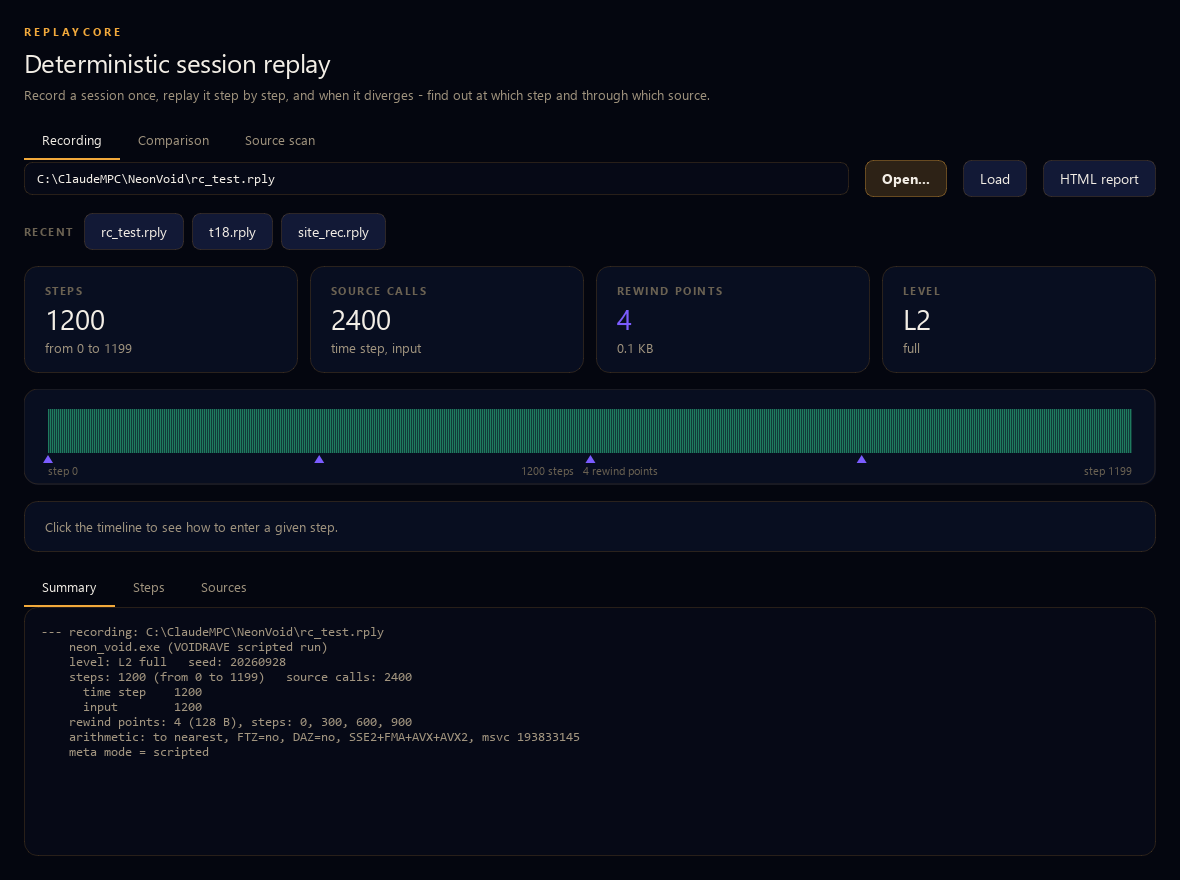
A real game: 16 000 lines of C++ on its own engine. This session went the deeper way, so you can step back into it at four points. The automatic way needs no change to the game at all.
Five things can part two runs. It watches all five.
A replay that only records input is a replay that lies. These are the ways a session really drifts.
The sources
Random numbers, the clock, input, network, physics, files. Each one is gated: recorded on the way out, handed back on the way in. The report counts how many times the live machine would have given a different answer - and gave the recorded one instead.
The state
A hash of the simulation state every step. If the sources all agreed and the state still parted, the bug is in the game's own code - uninitialised memory, a stale pointer, a race - and the report says at which step it started.
The order
Iteration over a TMap, a TSet or an unordered_map promises
nothing about order, and tasks finish in whatever order the thread pool decides. ReplayCore hashes the
ORDER, not the contents, so it sees this before any number has changed.
The arithmetic
The rounding mode, flush-to-zero, denormals, which SIMD the CPU has, whether the compiler contracted
a*b+c into an FMA. Two machines that compute differently produce different sessions, and
the fingerprint says so in one sentence instead of a week of hunting.
The threads
Calls arriving from outside the simulation loop are counted and reported, not silently recorded, so a
worker thread reaching for rand() shows up as what it is.
And it survives the crash
The stream is flushed every step, so the session that crashed the game is still on disk.
repair rebuilds the recording from it. The bug that only happens before a crash is exactly
the bug nobody can reproduce.
Two ways in. Both of them real.
Start without touching the game at all. Go deeper when you want to rewind inside the session.
| The automatic way | The deeper way | |
|---|---|---|
| What the project needs | one compiler flag: /FI rc_auto.h and four source files added to the build. Not one line
of the game changes. |
the same files, plus a handful of calls in the simulation loop: the sources you gate, the state you hash, the snapshot you take. |
| What it catches | a different path through the game's own code, a different state in the module's data, the arithmetic of the machine, calls from other threads | all of that, with the state being YOUR structures instead of the whole module - so a divergence points at a field, not at a byte offset |
| Rewind | no: there is nothing to restore a game's state from unless the game hands it over | yes: snapshot() in the loop, then enter the session at any rewind point |
| Driven by | environment variables, because the command line belongs to the game | your own code, at whatever moment makes sense |
rem the automatic way: record, then replay the same session
cl /FI rc_auto.h  game.cpp  rc_auto.cpp rc_core.cpp rc_file.cpp rc_arith.cpp
set RC_RECORD=session.rply && MyGame.exe
set RC_REPLAY=session.rply && MyGame.exe
// the deeper way: in the simulation loop
rc::step_begin(step);
float dt     = rc::gate_f32(rc::Src::Delta, measured_dt);
uint32_t in  = rc::gate_u32(rc::Src::Input, read_input());
UpdateGame(dt, in);
rc::order_check("enemies", enemy_ids, enemy_count);   // TMap / unordered_map
rc::state_hash(&simulation, sizeof(simulation));
rc::snapshot(&simulation, sizeof(simulation));        // a rewind point
rc::step_end();
A verdict, not a wall of numbers
The question is never "did it diverge". It is "whose fault is it, and where do I look".
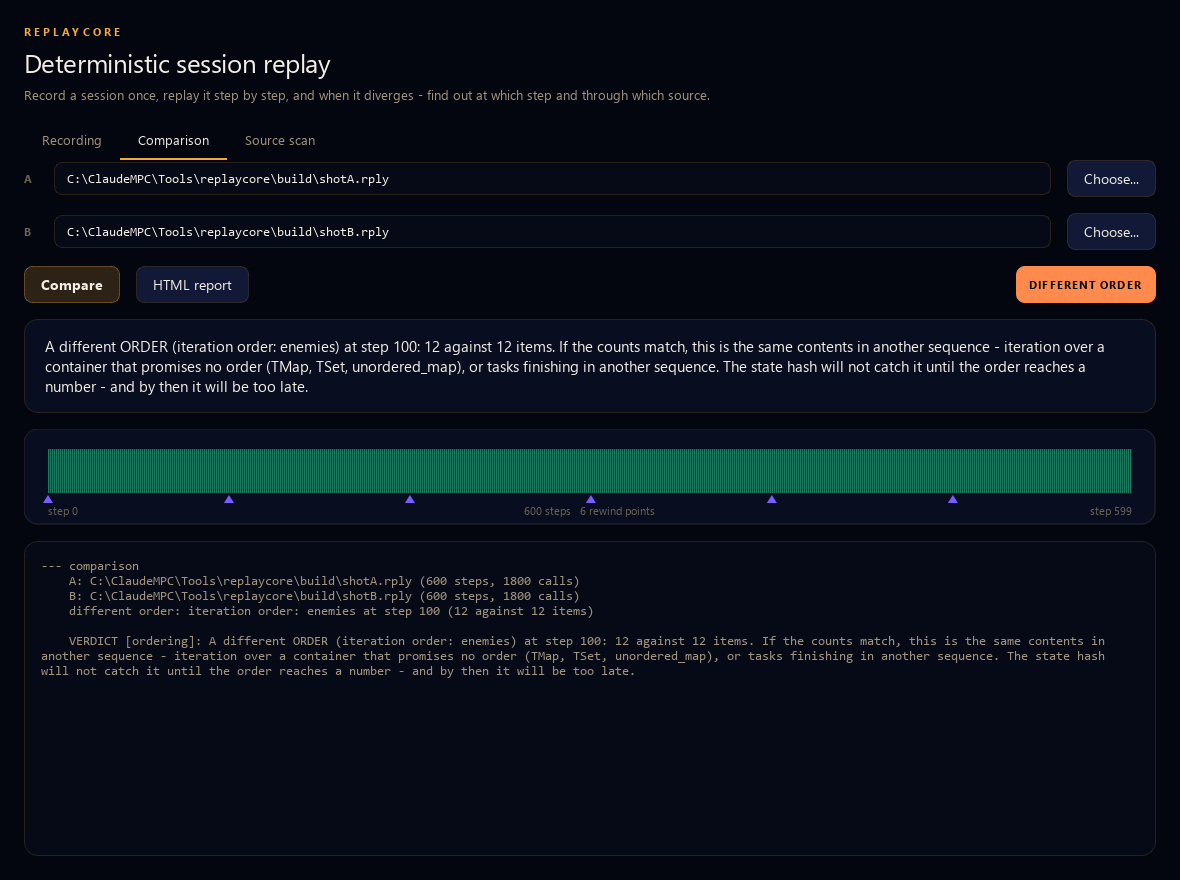
A planted iteration-order bug: the same 12 items in another sequence at step 100. No number had changed yet - the state hash alone would have missed it.
Step back into the session
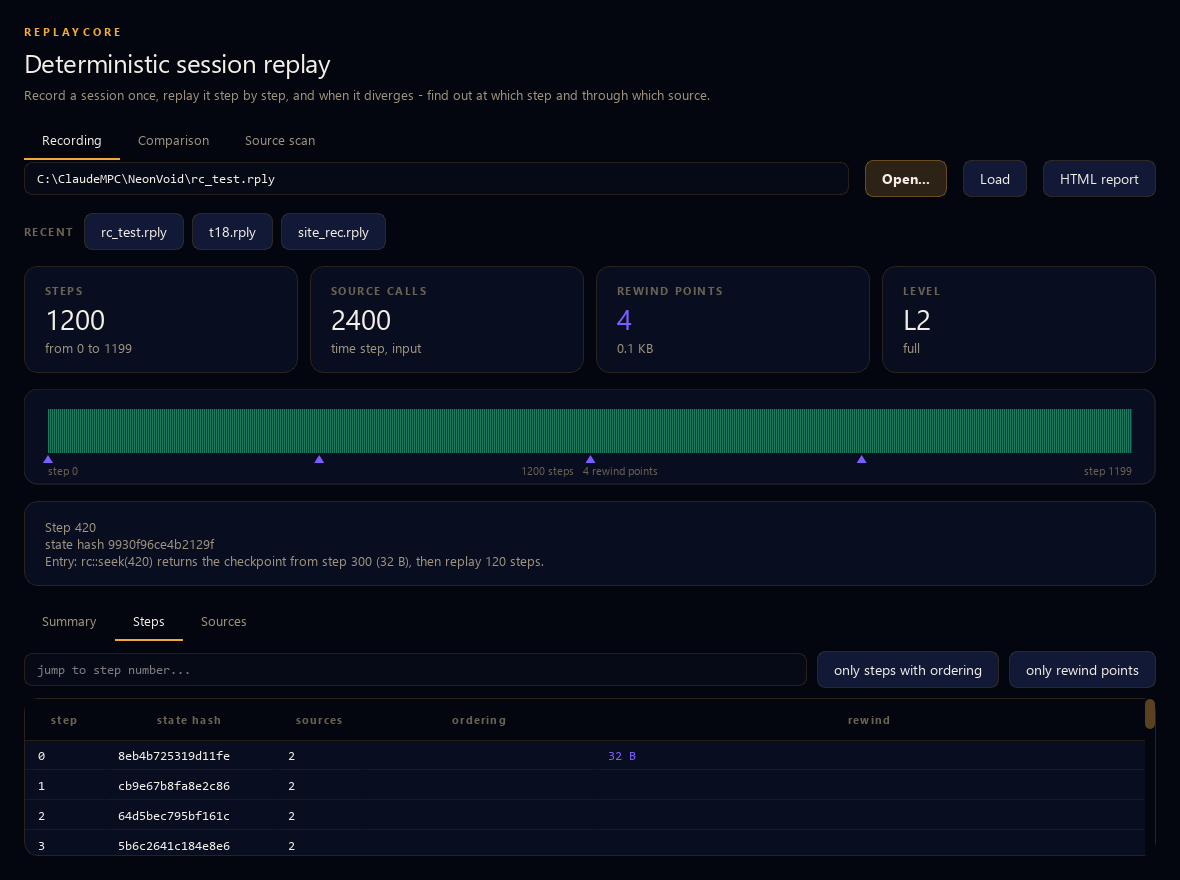
Every rewind point is a state the session can be entered from. Instead of playing twenty minutes up to the bug, enter at the step before it, with the same inputs, as many times as you need.
The timeline shows where those points are, and the application tells you exactly how to reach a given step from the nearest one.
Before you record anything
The scanner reads your sources and lists the places a session can drift - with the file, the line and the code.
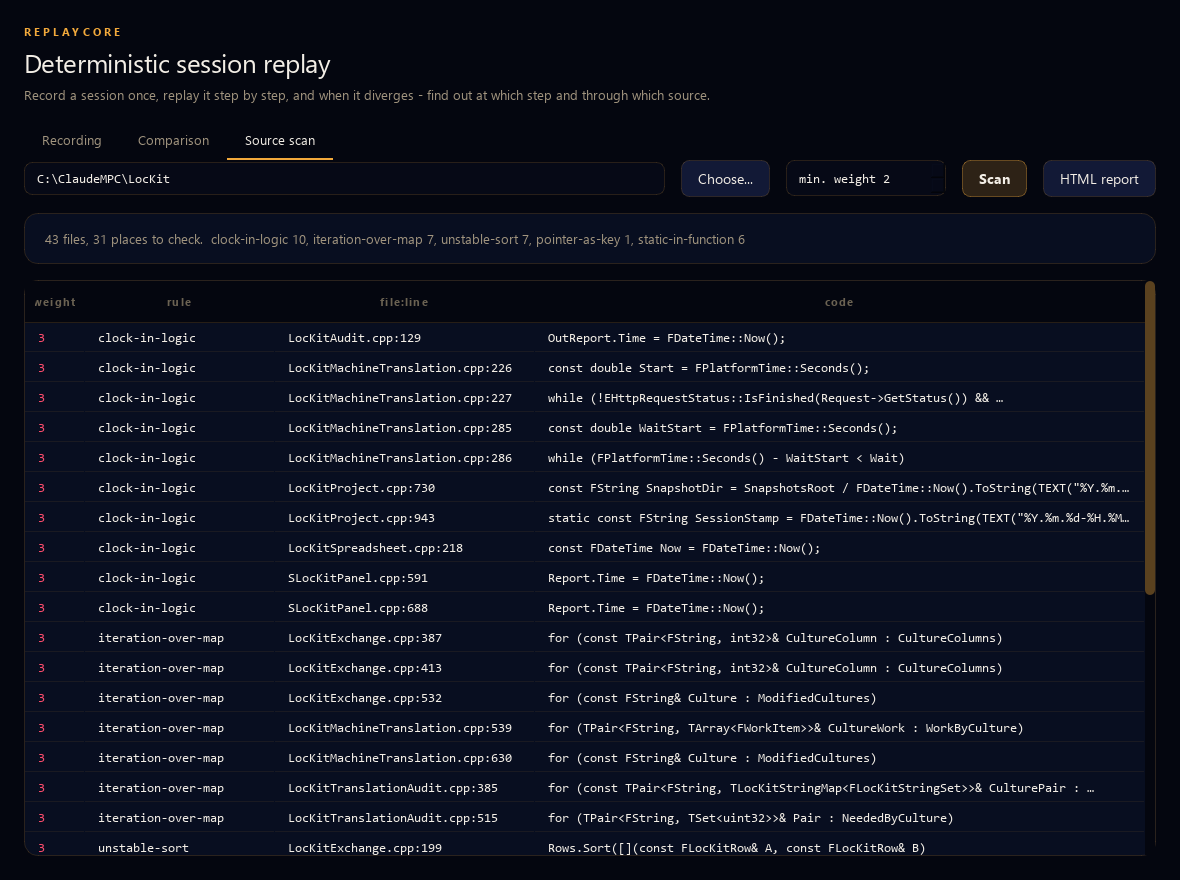
Real Unreal Engine sources: 43 files, 31 places worth checking, ranked - the clock read inside logic, iteration over a TMap, an unstable sort, a pointer used as a key, statics in functions.
In the application, on the command line, and in CI
The application
Three screens: the recording and where it can be entered, the comparison and its verdict, the source
scan. Drop a .rply file on the window and it opens.
The command line
info, diff, report, rewind, repair,
scan. Exit code 0 when the runs agree, 1 when they do not, 2 on a usage error - so a
build machine can gate on determinism without anyone reading the text.
Claude Code and other agents
ReplayCore is also an MCP server. An agent can ask it what is in a recording, what the verdict is and how to integrate the core, and get the same answers you see.
What it does not do
Written down here rather than discovered after the purchase.
| Limitation | Why |
|---|---|
| C and C++ built from source only. Unreal Engine, your own engine, plain C++. Not Unity (C#), not Godot script, not somebody else's finished .exe | both ways in take part in your build; there is nothing to attach to a binary you cannot compile |
Windows and MSVC are what we test. The core is plain C++17 and the automatic way exists for clang's -include, but we have not run that gate |
we would rather say this than let you find out |
| On the automatic way, a difference that is there in the very first frame is reported as exactly that - start-up state of the process, or a bug present from frame one, and it cannot tell which | from outside the game, an address, a handle and a day-one bug look alike. The deeper way, where the state is your own structures, has no such doubt |
| A source you do not record cannot be replayed | that is what the scanner is for: it lists the places before you spend a week on a replay that drifts |
Using Unreal Engine? There is a plugin.
The same core, wrapped for UE 5.8: the engine's own time step is driven from the recording, randomness comes from a stream seeded with the session, and one call hashes a whole actor class with its iteration order checked separately. Console commands, Blueprint nodes and a demo actor built from code alone, with no assets to migrate.
$59, one-time, perpetual — not an annual licence like the application below. Get the UE plugin →
Pricing of the application
Annual licenses for the standalone application: window, command line and CI gate in one. Every update during the year is included. Ship the core in your game at no extra cost.
- The full application
- The ReplayCore core sources
- Command line and MCP server
- Everything in Indie
- One key for the whole team
- $99.80 per developer
- Everything in Team
- For a whole studio
- $74.50 per developer
- Unlimited PCs in one company
- The determinism gate on your build machines
- One payment for the whole studio
- Everything in Studio Site
- Onboarding and support
- Integration with your engine
Windows 10 and 11. Payment through PayPal. A seat is one computer; one key covers the whole package, so there is no number to pick at checkout. Try everything free for 14 days first. Renewing? Buy the same plan with the same e-mail and your key is extended by a year.
ReplayCore is digital content delivered immediately: no refunds once the key is issued, support included instead. By using ReplayCore you accept the EULA and terms.
FAQ
Do I have to change my game's code?
No, not to start. The automatic way needs one compiler flag and four source files in the build; the game itself is untouched. We proved that on our own shipped game: 16 000 lines, recorded and replayed without editing a single line of it. You add calls later, when you want rewind points and a state hash over your own structures instead of over the module's data.
Does it work with Unreal Engine?
Yes - Unreal is C++ you build yourself, which is the requirement. Gate FMath::Rand*, the
delta time, input and timers; hash the state you care about. The ordering detector exists because
TMap and TSet iterate in no promised order, which is one of the commonest
reasons two Unreal runs part. Chaos has its own threading: if a physics result flows back into the
simulation, record it as a source.
Does it work with Unity or Godot?
No. The core is C++ compiled into your program, and Unity's game code is C#. If your engine is C or C++ and you build it yourself, it works; if you cannot compile the program, there is nothing to attach to.
What happens when the game crashes mid-session?
The recording survives. The stream is written and flushed every step, so what is on disk is everything
up to the crash; repair turns it into a normal recording. A session that ends in a crash is
usually the session you most want back.
Can I ship a game with ReplayCore compiled in?
Yes, at no extra cost and with no per-copy fee. Recording is off unless your program turns it on, so the calls can stay in a shipping build - and a tester's bug report can arrive as a recording. What you may not do is redistribute the core sources as a recording-and-replay product of your own.
Does anything leave my computer?
Only the license check: the key, a one-way hash of the PC, the version and the PC name. Recordings, source code, project names and paths never leave. After activation ReplayCore works offline for up to 30 days.