Buildsworn Quickstart: from nothing to your first map and your first gate
For people who have never used Claude Code, a terminal or an MCP server. No theory, one action per step, and what you should see. The long reference is GETTING-STARTED.md; you do not need it today.
What you are building: a setup where you talk to Claude in plain English, Claude builds and edits things inside the Unreal Editor through Epic's own connector, and Buildsworn makes Claude prove the result (compile, tests, logs, screenshot) before it says "done".
Time: about 30 minutes, most of it downloads.
Step 0. Words you will meet (read once)
| Word | What it means here |
|---|---|
| Terminal | A text window where you type commands. On Windows: press Win, type PowerShell, Enter. |
| Claude Code | Anthropic's AI agent that runs in that window. You type in English, it works on your files. Paid Anthropic plan required. |
| MCP server | A helper program Claude Code can call. Epic ships one for the editor (unreal-mcp); Buildsworn is another one. |
| Plugin (Claude Code) | Adds slash commands like /start and /gate, plus safety rules, to Claude Code. Buildsworn installs one. |
| Gate | A check that must pass: compile, tests, logs. /gate runs them all and prints a PASS/FAIL table. |
| License key | BSWN-XXXX-XXXX-XXXX-XXXX from your e-mail (Solo is free: get a key). Empty in the installer = 7-day trial. |
Step 1. Install Claude Code (5 minutes)
- Go to https://claude.com/claude-code and follow the Windows install instructions.
- Open a terminal (
Win, typePowerShell, Enter) and type:claude --versionYou should see a version number. If you see "not recognized", close the terminal, open a new one and try again (the install added it to PATH, but old windows do not know yet). - Type
claudeand Enter. First run asks you to log in with your Anthropic account in the browser. Do it, then type/exit.
Step 2. Unreal Engine 5.8 with Epic's Model Context Protocol plugin (5 minutes)
Buildsworn works with UE 5.6, 5.7 and 5.8, but the "Claude builds my map" part uses Epic's official connector, which exists from 5.8. If you are on 5.6/5.7, skip to Step 3; Buildsworn has its own smaller editor bridge for those versions.
- Epic Games Launcher, Unreal Engine, Library: install 5.8 if you have not.
- Open your project (or create one: Games, Third Person, C++, name it
BrainTest). - Menu Edit, Plugins. Search Model Context Protocol. Tick Enabled. Restart the editor when asked.
- After the restart, open the output log (Window, Output Log) and type in the console line at the bottom:
ModelContextProtocol.StartServerYou should see a line that the server listens on127.0.0.1:8000. (Buildsworn's/startwill later tell you if it is not running.)
Also needed once: Visual Studio 2022 with the "Game development with C++" workload, exactly as for any C++ project. If your project already compiles from the editor, you have it.
Step 3. Install Buildsworn (5 minutes)
- Open the e-mail with your key (free Solo registration or Studio purchase). Click Download the installer (
buildsworn-setup.exe, about 40 MB). - Run it. Windows shows "Windows protected your PC" (we are a small studio and the installer is not yet code-signed). Click More info, then Run anyway. You can check the file on virustotal.com first; it has zero detections.
- Wizard pages, what to type:
- Engine root: leave the default if the engine is in
C:\Program Files\Epic Games. Workspace: leave the default. - Project folders: where your
.uprojectfiles live. DefaultDocuments\Unreal Projectsis right for most people. - License key: paste the key from the e-mail. No key yet? Leave it empty: you get a 7-day trial on this machine. PixelLab and Gemini keys: leave empty for now.
- Claude Code plugin: leave it ticked. Telemetry: your choice, off by default.
- Finish. A black window flashes for a few seconds: that is the configuration step. It registers Buildsworn (and, on 5.8,
Epic's
unreal-mcp) in Claude Code and starts indexing your engine's API in the background (about 3 minutes, you can continue).
Step 4. Check that Claude sees everything (2 minutes)
- Open a terminal in your project folder: in Explorer, open the folder with the
.uproject, click the address bar, typepowershell, Enter. - Type
claudeand Enter. - Type
/mcpand Enter. You should seebuildswornconnected and, on 5.8,unreal-mcpconnected (the editor must be open). - Type
/startand Enter. You should see a short report: license OK (or TRIAL with days left), API index ready or still building, your project found, editor bridge status, and the project briefing (real output from the demo project):
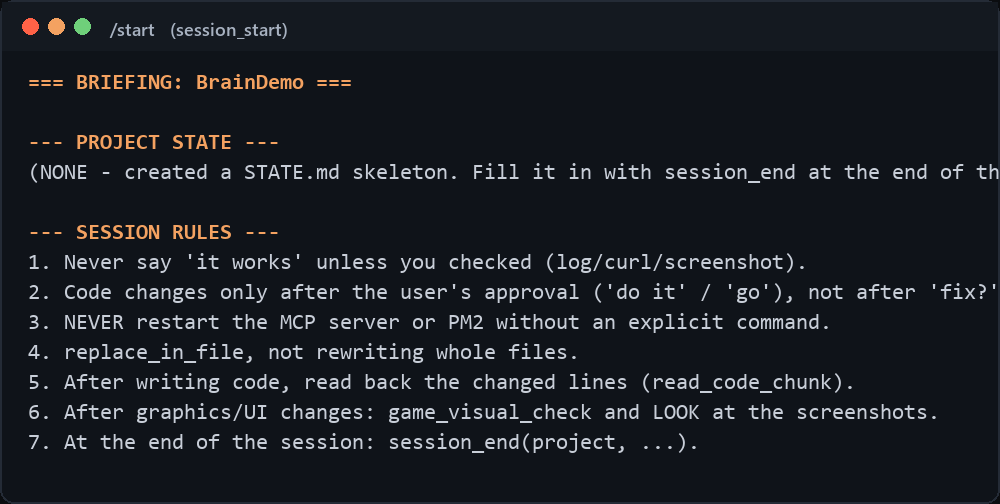
Something red? The report says what to do. Most common: the editor is closed (unreal-mcp cannot connect) or the license key has a typo.
Step 5. Your first map, built by Claude (10 minutes)
With the editor open and the terminal in the project folder, type to Claude in plain English, for example:
Using unreal-mcp, create a new level called TestArena. Add a 40x40 m floor, four walls, a player start in the middle, a directional light and a sky. Then save the level.
Watch the editor: actors appear as Claude calls Epic's tools. When Claude says it is done, do not take its word for it:
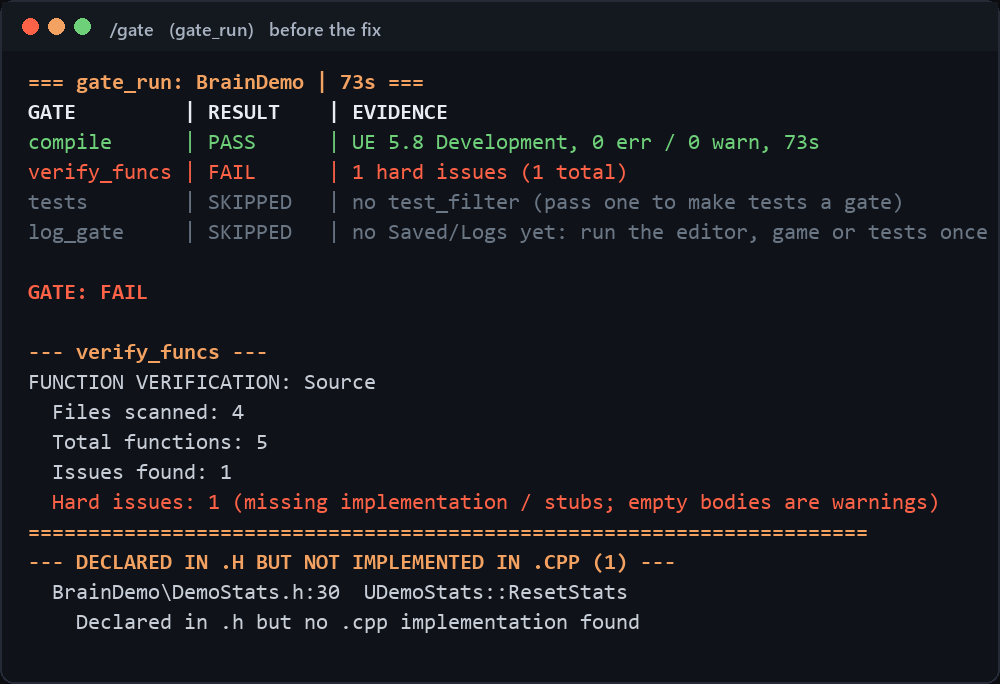
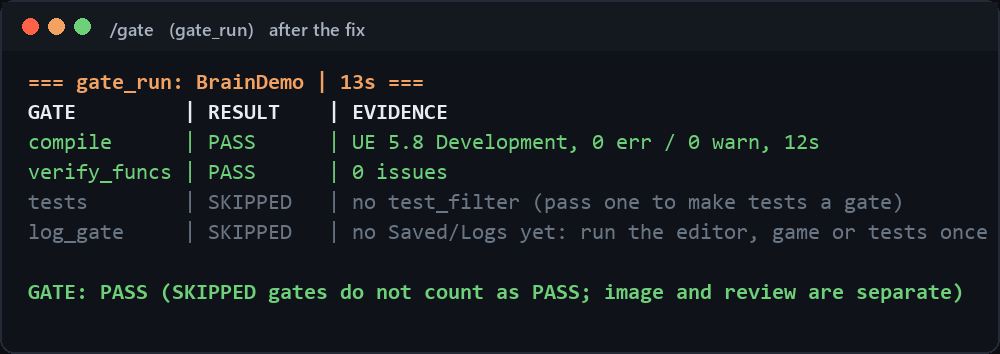
/gate
You should see a table: compile PASS, verify_funcs PASS, tests PASS (or SKIPPED if the project has none), log PASS.
If any line is FAIL, the reason is under the table. Tell Claude: "fix the FAIL and run /gate again".
This is what it looks like on the demo project that ships with Buildsworn, which has one function declared without a body on purpose:
After "fix the FAIL and run /gate again":
Ask for a picture of the result:
Take a screenshot of the TestArena viewport with ue_screenshot and describe what you see.
That screenshot is your proof, not the sentence "the level is ready".
Step 6. Working like this every day
Real examples of building a game this way (actors, multiplayer pickups, HUD, data tables, tests, Steam): the Cookbook.
- Start every session with
/start(state, license, what changed). - Editor work (levels, Blueprints, widgets, materials): ask Claude, it uses
unreal-mcp. - C++ work: Claude edits files; every edit gets an automatic
.bakcopy next to it (Buildsworn hook). - Before you believe "done":
/gate. Before you ship:/release. - Claude wants to delete something or kill a process: it must ask you first (Buildsworn hook). Say no when in doubt.
- End of the day:
/session-endwrites a short state note so tomorrow's/startknows where you left off.
When it does not work
| You see | Do this |
|---|---|
| "Windows protected your PC" | More info, Run anyway. Explained above. |
claude is "not recognized" |
Open a new terminal window. Still not? Reinstall Claude Code. |
/mcp does not list buildsworn |
In a terminal: claude mcp list. Not there? claude mcp add --scope user buildsworn -- "C:\Program Files\Buildsworn\buildsworn\buildsworn.exe" |
unreal-mcp failed to connect |
The editor is closed, or the plugin is off, or the server did not start: ModelContextProtocol.StartServer in the editor console. |
/start says UNLICENSED |
Typo in the key, or no internet during install. Ask Claude: "call license_activate" and read the reason. No key: run buildsworn --trial in a terminal. |
/start says seat limit |
The key is already on the allowed number of machines. Write to support with the first 9 characters of the key. |
| Lost the e-mail with the key | Product page, "Lost your key?", type your PayPal e-mail. |
| Anything else | In a terminal: buildsworn --support-bundle. Send the zip from your Desktop to support@adrenalinegames.pl. It contains logs and no project files. |
Support: support@adrenalinegames.pl or the contact form, reply within two working days. Discord: discord.gg/QK8J5GrhmR