AMEM: see which code is eating your game's memory
One tool for Unreal Engine, your own engine and plain C++. It measures memory, frame time and CPU of a running game, turns memory into a 3D city you can click, takes you to the function, file and line, and compares the game before and after the fix.
See pricing Documentation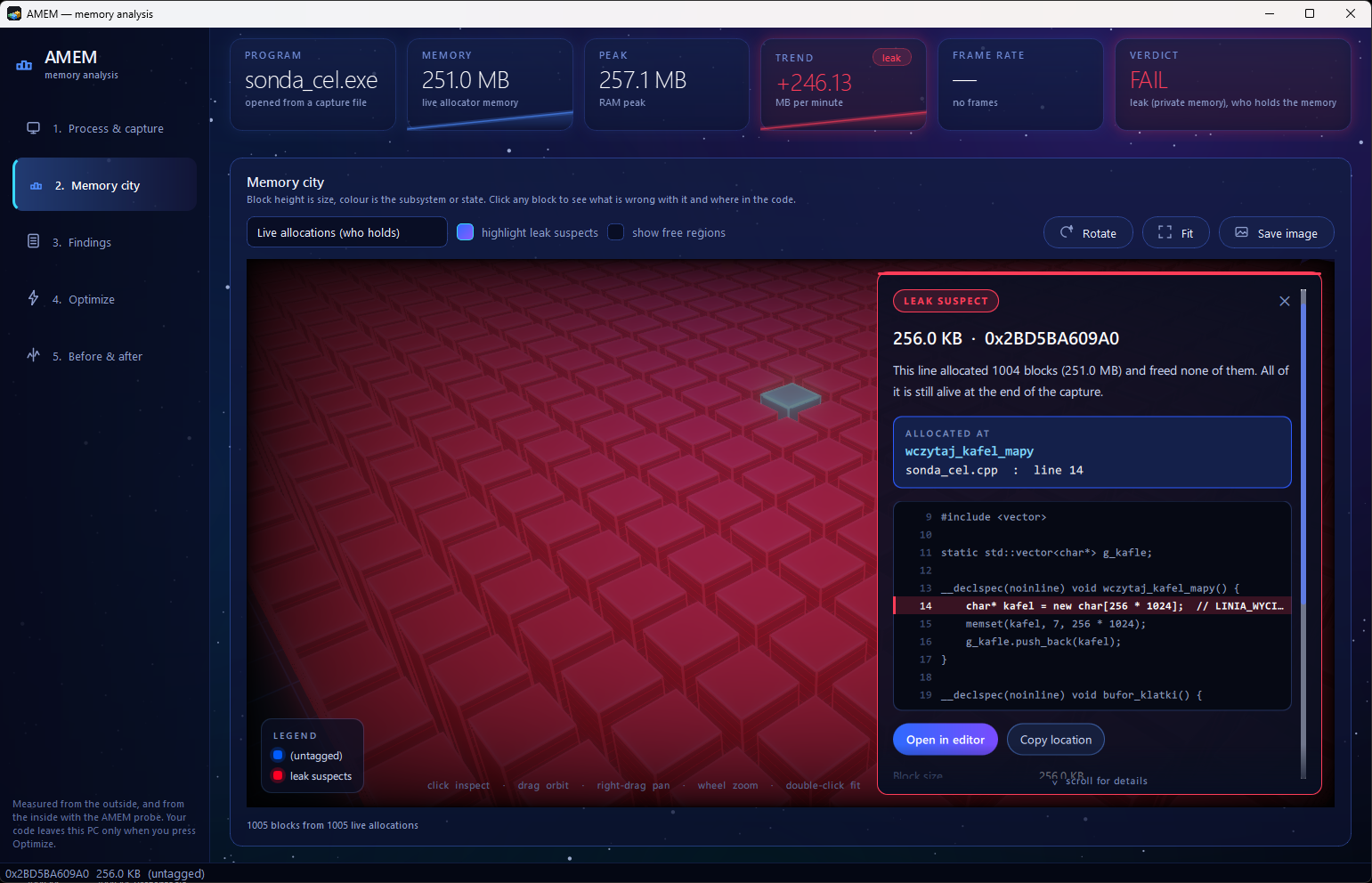
Click a block in the memory city: the function that allocated it, the file, the line and the code, one click away from your editor.
AMEM in 60 seconds
A real game with a real leak: measured, pinned to the line, fixed with Claude Code and measured again. The full 4-minute walkthrough is in the documentation.
One tool instead of five
Memory, frames and CPU on one time axis, the same report for every engine, and an answer a producer can read.
Memory from the outside
Pick any running program. AMEM reads its memory from the outside: growth curves, peak RAM, committed memory and the map of the whole address space. Nothing to install in the game, it works on a packaged build as it ships.
Down to the line of code
Add the AMEM probe to your build: four source files and one CMake line, no code changes. Every live allocation gets its call stack, and the report names the function, file and line that holds the memory.
Frames, hitches and the reason
Frame time of any game through PresentMon: average FPS, 1% and 0.1% low, hitches, uneven frame pacing, and which hitches came together with a jump in memory.
CPU or GPU, and which function
CPU sampling with call stacks shows the functions that take the CPU time, what the CPU was doing during a hitch, and whether the frame is limited by the CPU, the GPU or the program's own waiting.
Hours, not seconds
Capture until you stop: play for as long as you need, AMEM saves a checkpoint every 5 minutes. On a long session the report finds the moment memory stopped being stable. Loading and closing the game are recognised and left out of the verdict.
Before and after, also in CI
The first capture becomes BEFORE. Fix the problem, press Measure AFTER the fix, and AMEM compares the two on its own: leak gone or not, peak memory, 1% low, hitches per minute. The same gate runs on a build machine and returns an exit code.
Built for the people who sign off
Engineers get file and line. Producers get a verdict they can read without a profiler course.
The memory city
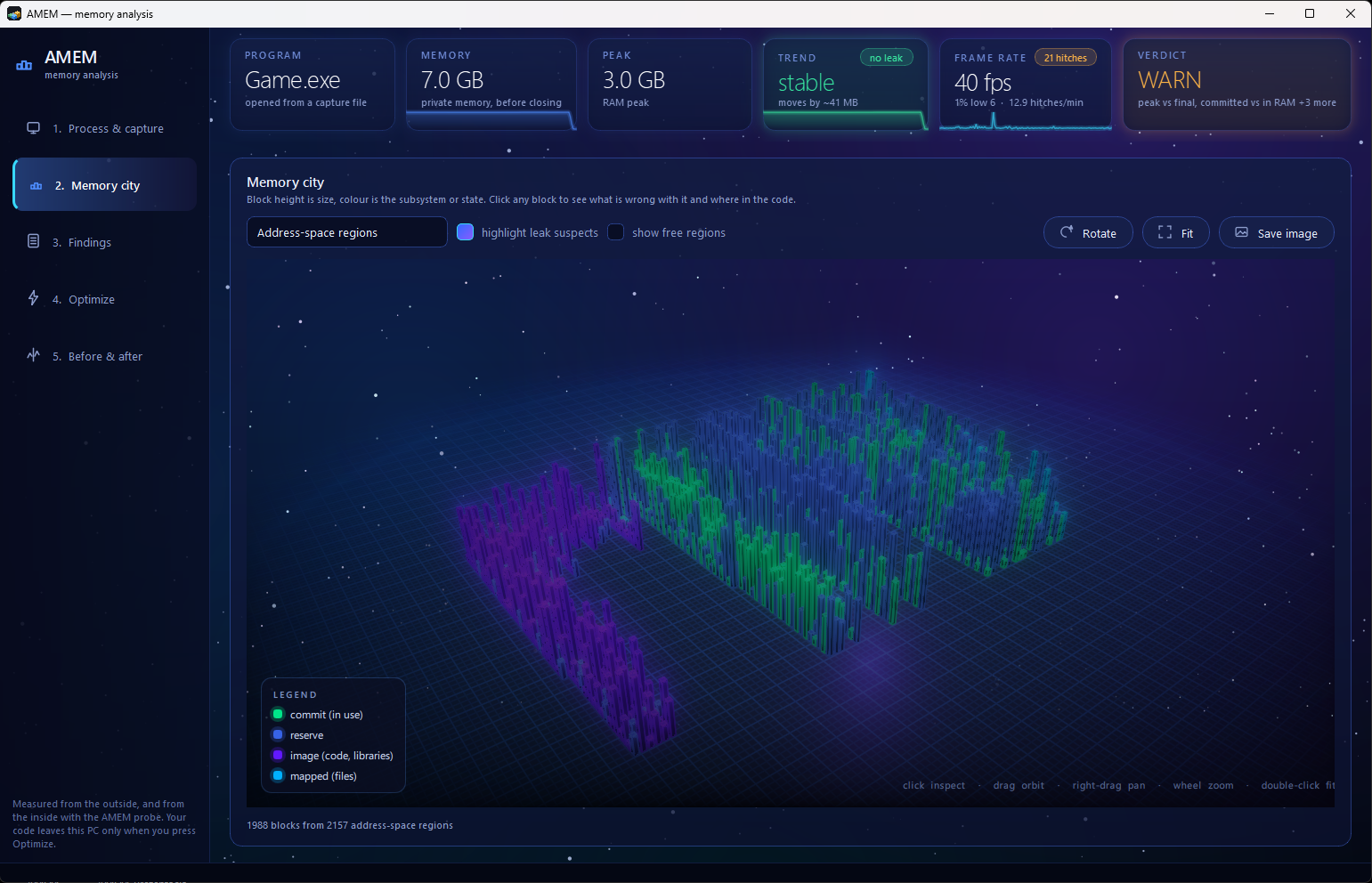
Every block is a piece of memory: height is size, colour is the subsystem or state. Leak suspects glow red with a beam of light over the culprit. Three views: live allocations, address-space regions and the inside of the heap.
Orbit, zoom, click. Each block says what is wrong with it and where it came from.
Findings in plain words
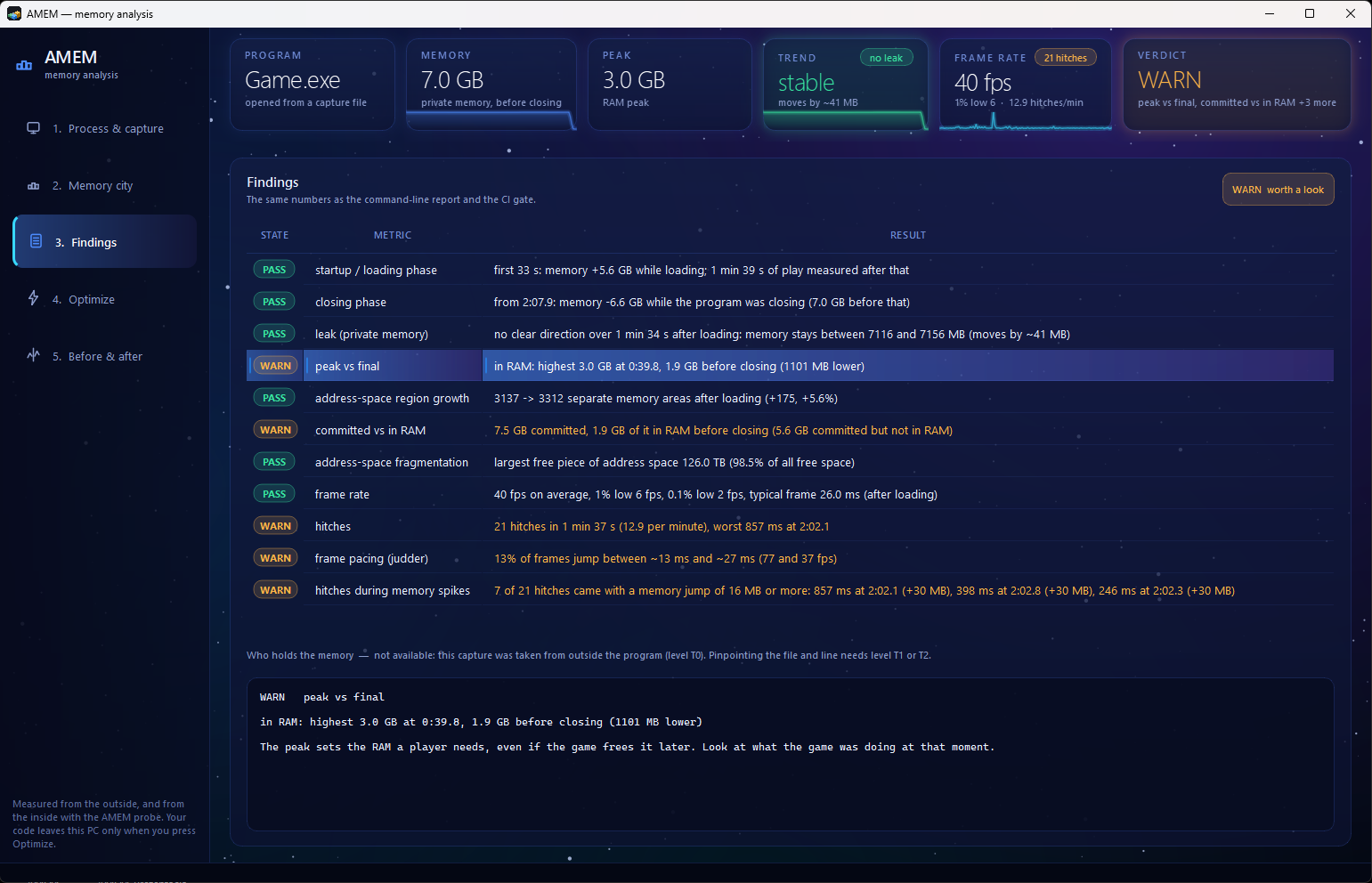
Every check is a row with a state, a number and one sentence about what it means: "no clear direction over 1 min 34 s after loading", "7 of 21 hitches came with a memory jump of 16 MB or more".
The same numbers come out of the command line as Markdown or JSON, and the gate uses exit codes 0, 1 and 2.
How deep it goes
Start with nothing installed. Add the probe when you want file and line.
| What the project needs | What you get | |
|---|---|---|
| Outside | nothing, just pick the running program | memory curves, peak, address-space map, frames, CPU by function (with a .pdb) |
| AMEM probe | four source files and amem_attach(MyGame) in CMake, no code changes | every live allocation with its call stack, lifetimes, heap fragmentation, file and line on click |
include(path/to/amem.cmake)
amem_attach(MyGame)   # the probe, plus symbols for the game and its own libraries
Probe overhead, measured on 2 million new/delete pairs: about 40 ns without the probe, about 850 ns with a call stack for every
allocation, about 390 ns with AMEM_STACK_ONE_IN=8. Build it into a profiling executable, not the one players get.
Your code stays on your PC
| What | Needs | Leaves this PC? |
|---|---|---|
| Memory capture | normal user | no |
| Frames and CPU sampling | Windows asks for permission once per capture, for a small helper only; the AMEM window never runs as administrator | no |
| Probe snapshot | nothing | no |
| Optimize (optional) | Claude Code installed | yes: the work orders and the source files Claude reads, only when you press the button |
Optimize turns the findings into work orders with evidence and an effort estimate in hours. Claude Code reads your code with read-only access, a diff comes back, nothing is written until you approve it, and every changed file gets a backup copy. AMEM also works as an MCP server for Claude Code.
Pricing
Annual licenses. Every update during the year is included.
- The full application
- The AMEM probe
- Command line and MCP server
- Everything in Indie
- For companies and teams
- Buy as many seats as you need
- Unlimited PCs in one company
- The before/after gate on your build machines
- One payment for the whole studio
- Everything in Studio Site
- Onboarding and support
- Integration with your engine
Windows 10 and 11. Payment through PayPal. Studio: choose the number of seats in PayPal. Try everything free for 14 days first. Renewing? Buy the same plan with the same e-mail and your key is extended by a year.
AMEM is digital content delivered immediately: no refunds once the key is issued, support included instead. By using AMEM you accept the EULA and terms.
FAQ
Does it work with Unreal Engine?
Yes, from the outside: memory, frames and CPU by function work on any Unreal build, editor or packaged. AMEM also reads the project from the editor's command line, so it knows which project's binaries and sources belong to the process.
Do I have to change my code?
No. Measuring from the outside needs nothing. The probe is four source files added to the build and it starts by itself before main().
How long can a capture run?
Until you stop it. AMEM saves a checkpoint every 5 minutes, so a long session is never lost.
Why does Windows ask for permission?
Frame timing and CPU sampling use Windows event tracing, which needs administrator rights. Only a small helper gets them, once per capture, and it exits when the capture ends. If you say no, the memory capture still works.
Is my source code uploaded anywhere?
No. Only the optional Optimize button sends work orders and the files Claude reads to Anthropic, and only when you press it.